# Send & receive NFTs

One of the standout features of the Fizen Super App is the support for NFT assets.

NFT holders can use Fizen to make NFT transactions like sending NFT instantly.

### Sending NFT

**Notice**: Make sure you have enough gas fees to execute the transaction.

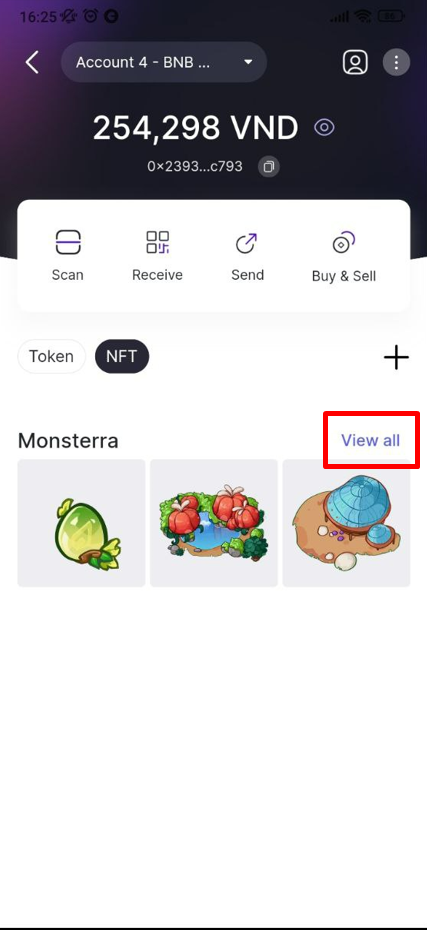
**Step 1**. In NFT section on the home screen, tap **View all** to see all the displayed NFT you own.

<div><figure><img src="https://2441864628-files.gitbook.io/~/files/v0/b/gitbook-x-prod.appspot.com/o/spaces%2FpxKpGNrotyZ0EkoVtsUZ%2Fuploads%2FrIAA5FWro7ZJ2lVn9PLj%2Fimage.png?alt=media&#x26;token=a7b43a05-af6d-4b2c-9349-c7daf2efb52e" alt="" width="216"><figcaption></figcaption></figure> <figure><img src="https://2441864628-files.gitbook.io/~/files/v0/b/gitbook-x-prod.appspot.com/o/spaces%2FpxKpGNrotyZ0EkoVtsUZ%2Fuploads%2FEB01TzTksGmRAMBHUKz0%2Fimage.png?alt=media&#x26;token=c59b49f6-daba-4b96-a3c5-51f81d9628fd" alt="" width="214"><figcaption></figcaption></figure></div>

**Step 2**. Tap the green ↗ button next to the NFT name.

<figure><img src="https://2441864628-files.gitbook.io/~/files/v0/b/gitbook-x-prod.appspot.com/o/spaces%2FpxKpGNrotyZ0EkoVtsUZ%2Fuploads%2Fmtam4FBzIORO3f6VqNtD%2Fimage.png?alt=media&#x26;token=09f5864f-a6c5-424a-afd9-95338ccec642" alt="" width="280"><figcaption></figcaption></figure>

**Step 3**. Paste the receiver’s wallet address or choose from your contact list.

<figure><img src="https://2441864628-files.gitbook.io/~/files/v0/b/gitbook-x-prod.appspot.com/o/spaces%2FpxKpGNrotyZ0EkoVtsUZ%2Fuploads%2FlPi5hnfBHJD8DLunxRtS%2Fimage.png?alt=media&#x26;token=f30956da-01cf-4d7a-b9ea-ff1984db629e" alt="" width="280"><figcaption></figcaption></figure>

**Step 4**. Next, check transaction details to review the information before sending.

When you are ready to sent, Swipe the bottom bar to send.

<figure><img src="https://2441864628-files.gitbook.io/~/files/v0/b/gitbook-x-prod.appspot.com/o/spaces%2FpxKpGNrotyZ0EkoVtsUZ%2Fuploads%2Fi1BCDJEUHjuO9FHRFYDF%2Fimage.png?alt=media&#x26;token=38999434-4c21-4721-a964-11e79f52dd63" alt="" width="280"><figcaption></figcaption></figure>

**Notice**: Remember to double (or even triple) check all details of the transaction. Blockchain transactions cannot be reversed.

### Receive NFT

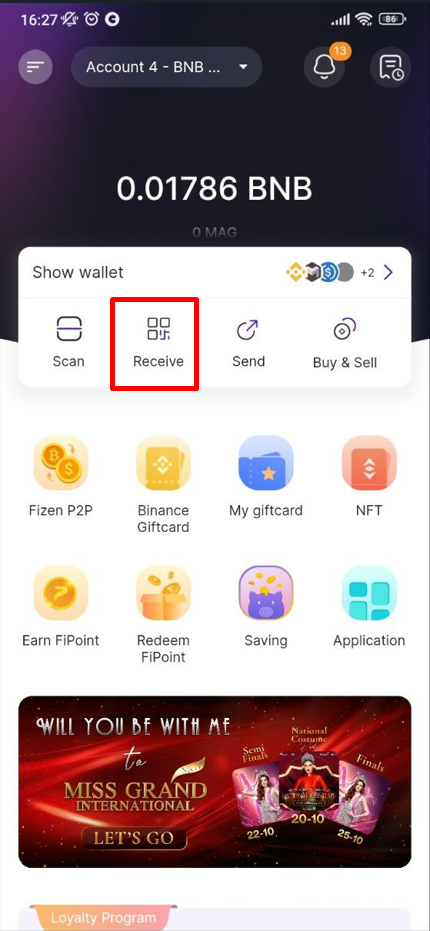
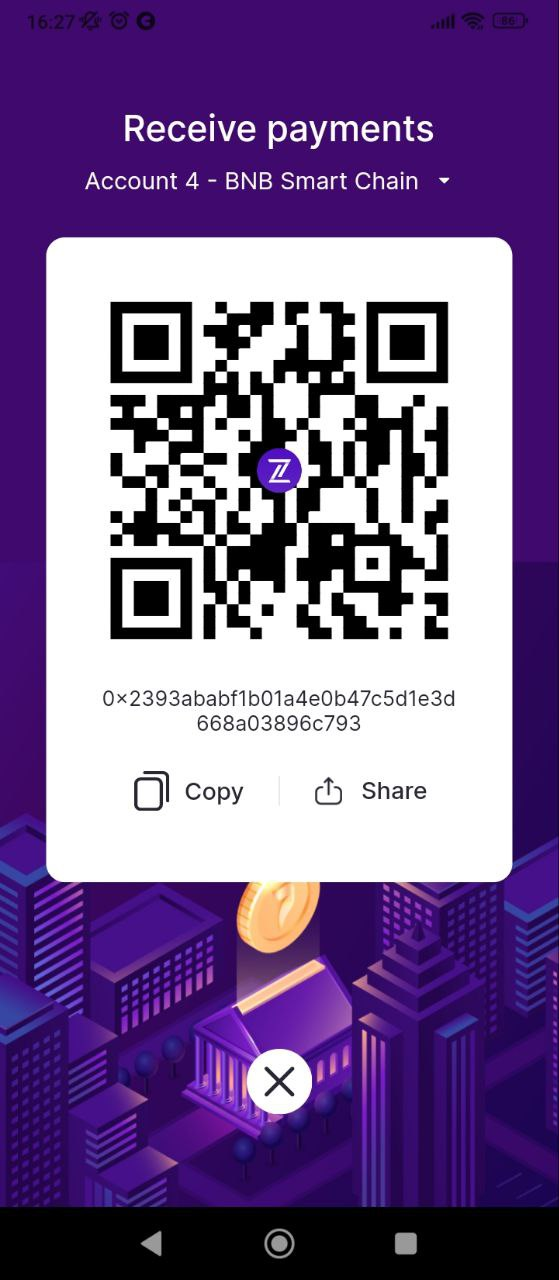
**Step 1**. Tap on “Receive” on the homepage or wallet page to provide the sender with your public address or QR code.

<figure><img src="https://2441864628-files.gitbook.io/~/files/v0/b/gitbook-x-prod.appspot.com/o/spaces%2FpxKpGNrotyZ0EkoVtsUZ%2Fuploads%2FDuCirX9Hrum1sJpeE1sI%2Fimage.png?alt=media&#x26;token=1b9568a4-1014-42b5-a88d-e504d462ce8e" alt="" width="323"><figcaption></figcaption></figure>

**Step 2**. Have the sender send the NFT.

<figure><img src="https://2441864628-files.gitbook.io/~/files/v0/b/gitbook-x-prod.appspot.com/o/spaces%2FpxKpGNrotyZ0EkoVtsUZ%2Fuploads%2FUvb2G6S1ko5v8QI6uB4A%2Fimage.png?alt=media&#x26;token=825269b2-9ee8-401f-a6db-91bf0881be0a" alt="" width="280"><figcaption></figcaption></figure>

**Bước 3**. Add the NFT to your Fizen Wallet.